


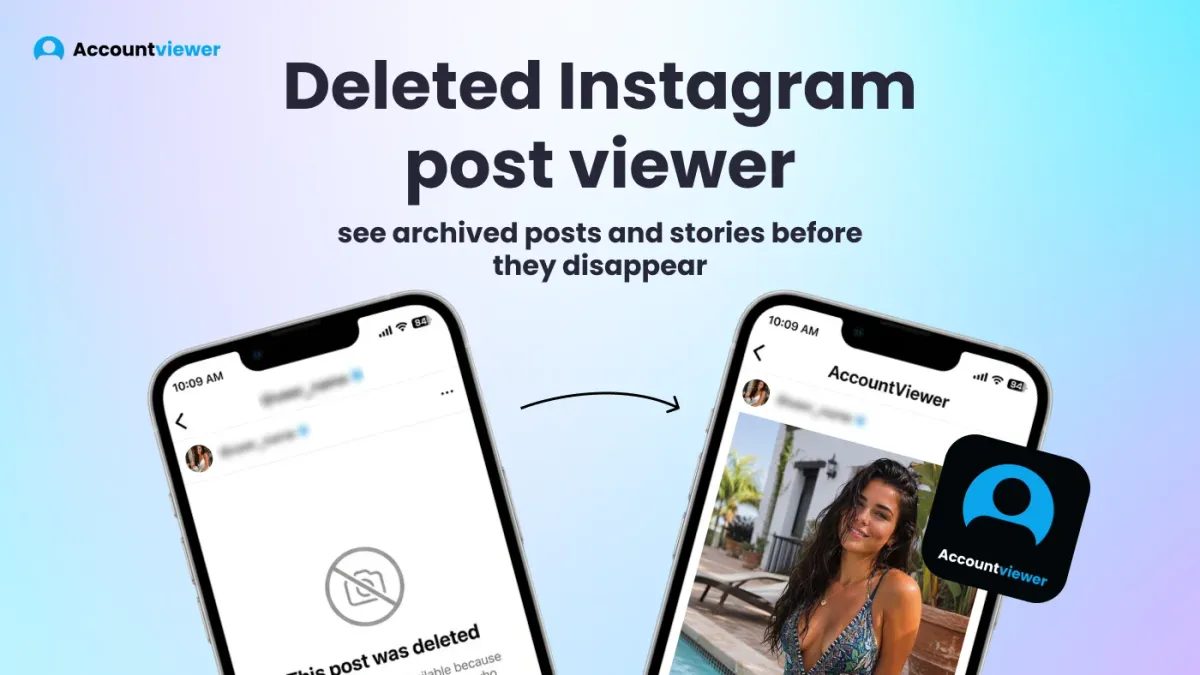
You watched a post go up, and then it was gone. Or you deleted something yourself and realized — too late — you needed it. Searching for a deleted Instagram post viewer tends to lead somewhere frustrating, and most results don't give you a straight answer.
Instagram has a built-in "Recently Deleted" folder for your own content — posts, reels, and stories stay there for 30 days before permanent removal. For someone else's deleted posts, the only realistic route is an archiving tool that captured the content before it was deleted. Nothing works retroactively. This article covers both audiences clearly, so you're not wasting time on something that doesn't exist.
What Is a Deleted Instagram Post Viewer?
A deleted Instagram post viewer is a tool that gives you access to Instagram content that's no longer visible on the platform. The definition covers 2 very different situations, and which one applies to you changes everything.
Most people searching for a deleted Instagram posts viewer fall into the first group — they deleted their own content and want it back. Instagram handles this natively with a built-in folder, and it's the fastest answer for this audience.
The second situation is content someone else deleted from an account you're watching. You can view deleted Instagram posts from another account only if an archiving tool was running before the content disappeared. An Instagram deleted posts viewer like Accountviewer captures posts and stories as they're published and stores them independently — so if the account owner deletes something later, your copy remains. The tool doesn't retrieve deleted content — it saves content before deletion happens, and any tool claiming otherwise isn't being straight with you.
How to See Deleted Instagram Posts from Someone Else's Account
Direct answer: not retroactively.
Once someone deletes a post from Instagram, it's gone from the platform. There's no back-end archive available to outside tools, no API that surfaces deleted content. I tested several tools claiming to view deleted Instagram posts from another account after the fact. Not one loaded real content — most showed placeholders, a couple asked for an Instagram login, and none produced anything that matched the actual account.
How to see deleted Instagram posts from someone else requires an archiving tool that was active before the deletion. If an account is being monitored when a post goes live, the content is captured and stored independently. If the account owner later removes it, the archived copy stays. That's how you view someone's deleted Instagram posts — not by recovering them, but by having saved them before they were gone.
If you want to view friends' deleted Instagram posts, the same logic applies. Add the account, and everything published from that point forward is automatically captured. It doesn't matter if the account owner clears their entire grid a month later — what was archived when it was published stays in your dashboard. People do this more often than you'd think: a grid wipe, a sudden account change, a post that disappears without explanation. If monitoring was running, none of that affects what's already saved.
How to see someone's deleted Instagram photos after a profile cleanup comes down to one thing: whether their account was being monitored before the content disappeared.
A deleted Instagram story viewer setup works the same way — stories that expire after 24 hours or get manually removed stay in your dashboard regardless of what happens on Instagram. For private accounts, a private Instagram viewer with no verification handles the access side, and the archive handles the rest.
One thing worth being clear about: a deleted Instagram posts viewer can only work with content published after monitoring starts. If a post was deleted before the account was added to the dashboard, it's gone. There's no way around that, and any tool claiming to retrieve pre-monitoring content isn't being honest. Start early, and the archive builds itself.
How to Find Deleted Instagram Posts (Your Own)
How to find deleted Instagram posts you've removed is simpler than most people expect — Instagram already built the answer in.
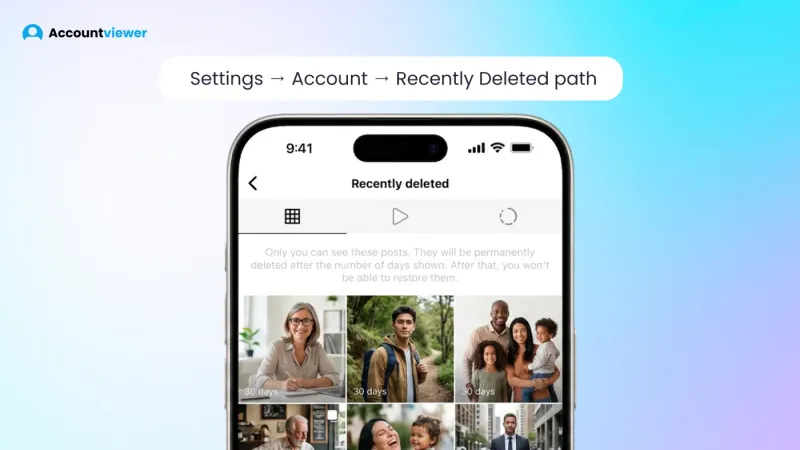
Instagram's built-in solution: Settings → Account → Recently Deleted
How to recover deleted Instagram posts starts in the app itself: go to your profile → tap the three-line menu → Settings → Account → Recently Deleted. Every post, reel, story, and IGTV video deleted in the last 30 days is stored there. You can restore it directly or remove it permanently. This is the recently deleted Instagram folder Instagram introduced in 2021 — useful, and almost nobody knows it's there.
The limits you need to know:
- 30-day window only — once content ages out of the recently deleted Instagram folder, it's gone from the platform permanently
- How to recover deleted Instagram posts beyond that point through Instagram's own system simply isn't possible — no extended archive, no recovery queue
- Your own content only — no access to other accounts' posts
How to find deleted Instagram posts from years ago is one of the most common questions in this space. The honest answer: no tool handles it. The folder resets every 30 days, and nothing before that window is accessible through Instagram or any third-party service.
I tested several apps claiming to recover permanently deleted posts. None produced real content. They either showed generic placeholder content, generated results that had nothing to do with the actual account, or asked for an Instagram login — a security risk worth avoiding. Instagram has no API for deleted content, which means there's no data for these tools to access in the first place.
How to find deleted Instagram posts from before monitoring started isn't possible — but going forward, the answer is archiving. If you want to view Instagram without an account, the access side is covered — and everything gets captured automatically from the moment you add an account.
Accountviewer — The Instagram Post Archiver That Saves Everything
The only way to view someone's deleted Instagram posts is to archive them before they disappear. Accountviewer's Personalized Content Hub lets you view deleted Instagram posts automatically — capturing posts, stories, and highlights from accounts you're monitoring, and storing everything for 3 months.
Personalized Content Hub — 3-Month Storage
This is the feature that directly solves the deleted Instagram post viewer problem. Everything captured from accounts you've added goes into a personal dashboard and stays there for 3 months. Posts, reels, stories — if they were published while monitoring was active, they're in your archive. Use it as a deleted Instagram story viewer too — stories the account owner deletes manually, or ones that expire after 24 hours, stay in your dashboard regardless. Storage is 3 months — that's the exact window, not an approximation.
Private Account Viewer
You can view private Instagram profiles as well as public ones — enter a username and the dashboard loads content without sending a follow request or notifying the account owner. Content that gets deleted is still covered, as long as monitoring was active when it was published.
Advanced Analytics Dashboard / Activity Tracker
The analytics layer builds a picture over time — not just a snapshot of what's live today. Follower changes, posting patterns, activity shifts across weeks are all tracked and logged. If you want to understand not just what was deleted but when someone's behavior changed, this is where that context forms. This Instagram deleted posts viewer pairs directly with the Instagram activity tracker use case.
Hassle-Free Experience
No Instagram login. No app to download. Open a browser, enter an email, pick a plan — full setup done. Works on any device: phone, tablet, or laptop. Nothing to configure, nothing to maintain. If you've used tools that required installations or account connections before, the difference is noticeable.
Security — No Personal Data Stored
Everything you do stays private — when you view deleted Instagram posts, nothing is logged, stored, or shared with third parties. No trail left behind. That applies to every search, every account you add, and every piece of content you access.
Premium Support — 24/7 Chat and Phone
A real person is available by chat or phone at any hour. For a deleted Instagram posts viewer most people use outside standard business hours, that availability matters more than it might seem.
How to Get Started
- Go to the website — no app, no install, opens straight in your browser on any device.
- Enter the Instagram username you want to monitor — just the handle, nothing else required.
- Choose a plan and sign up with your email address. No Instagram login at any point.
- Your dashboard starts loading — public accounts populate quickly, private accounts within up to 7 days.
Pros and Cons — Deleted Instagram Post Viewer Tools
Not every tool in this category does what it claims. I tested options across all three groups — and the differences are stark enough to save you some wasted time.
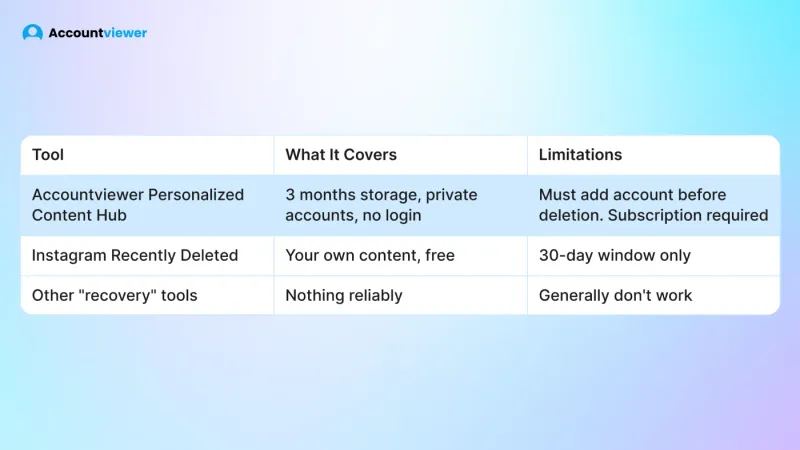
Instagram's built-in "Recently Deleted" folder is free, straightforward, and does exactly what it says. The catch is that it only covers your own content, and only within 30 days. Nothing beyond that window, nothing from other accounts.
Accountviewer is the only tool I found that handles the monitoring use case properly. It works on private accounts, requires no Instagram login, and stores captured content for 3 months. One condition applies: the account has to be added before content is deleted. Nothing is recoverable retroactively, and a subscription is required.
Third-party recovery apps are a different story. I tested several that claim to retrieve permanently deleted posts. None produced real content — most showed placeholders or generic results. A few asked for Instagram login credentials outright. Instagram provides no API for deleted content, which means these tools have nothing to work with. Avoid them.
FAQ
A deleted Instagram posts viewer is a tool that lets you access Instagram content that's been removed from the platform. For your own posts, Instagram's built-in "Recently Deleted" folder covers the first 30 days. For content from accounts you're monitoring, a dedicated archiving tool stores everything automatically for 3 months — including content deleted after it was captured.
Here's how to see deleted Instagram posts from someone else's account: you need an archiving tool that was already running before the content disappeared. Once Instagram removes a post, it's gone unless it was saved before that happened. If monitoring was active when the content was published, the archived copy stays for 3 months — regardless of what the account owner does afterward.
Instagram's "Recently Deleted" folder holds content for 30 days — after that, it's gone permanently. How to find deleted Instagram posts from years ago through any external tool isn't realistic. The only route is an archiving tool that captured the content before deletion — nothing works retroactively, and I haven't found a single tool that proves otherwise.
Instagram's own "Recently Deleted" feature is free and covers your own content for 30 days. For monitoring someone else's account, an Instagram deleted post viewer free option that works reliably doesn't exist. A proper archiving tool requires a subscription — but it's the only option that stores content before deletion and works on private accounts too.
Conclusion
Deleted Instagram post viewer tools work on one principle: content has to be captured before it disappears. Instagram's "Recently Deleted" folder is the right answer for your own posts within 30 days — use it while that window is open. For everything else, Accountviewer's Personalized Content Hub stores posts, stories, and reels for 3 months from the moment monitoring starts. The sooner you add an account, the more is covered — and nothing disappears on you again.