


Checking someone’s Instagram profile only gets you so far. You can see their posts, catch a story before it disappears, maybe notice a new follow — but nothing that tells you much about their actual behaviour on the app. Instagram controls that deliberately. What someone does versus what shows up on their profile are two completely different things.
This article walks through every practical method available — from Instagram’s built-in options to more structured approaches — so you can decide which fits your situation and how to check someone’s Instagram activity without drawing attention.
What Instagram Activity Can You Actually See? (Natively)
Instagram’s native tools show very little about another account’s behaviour. Here’s exactly what you can and can’t see without any third-party tool:
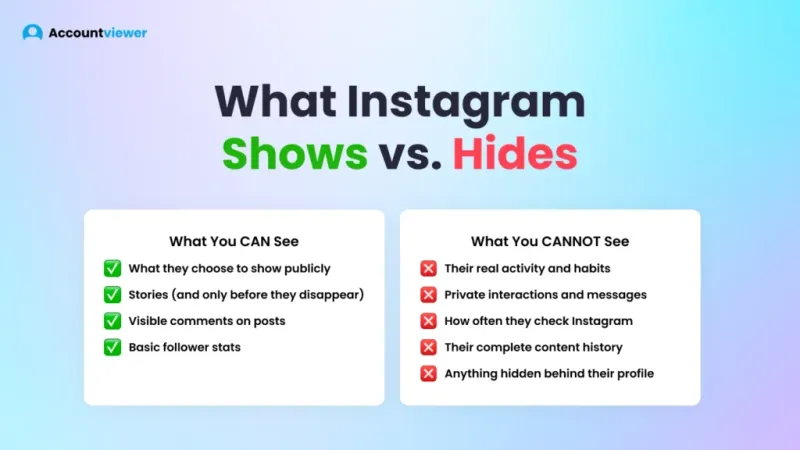
What you CAN see:
- Public posts on their profile grid
- Stories — but only if you watch them before they expire in 24 hours
- Public comments they’ve left on posts
- Their follower and following count
What you CANNOT see:
- When they were last active
- Who they’re messaging or interacting with privately
- How often they check the app
- Their full story and post history
- Any activity beyond what’s publicly visible on their profile
Before 2019, Instagram actually gave you a window into this. The “Following” tab showed you exactly which posts someone had liked and which accounts they’d just followed — in real time. It was genuinely useful — and then Instagram removed it without replacement. Many users still search for how to check someone’s Instagram activity today, unaware that the tab is gone.
That removal is what pushed people toward third-party solutions in the first place. If Instagram won’t show you what you need, something else has to. Some users approach this from the opposite direction entirely — rather than tracking others, they focus on how to hide Instagram activity on their own profile to avoid being monitored themselves. Both are valid concerns, and they often come from the same place.
Method 1: Watch Their Stories and Posts Manually
The simplest option: open their profile and check manually. Look for new posts, watch their stories as they appear. For occasional, low-stakes checking, this approach works well enough.
The limitations become obvious pretty quickly. Stories vanish after 24 hours, and if you weren’t there to catch them, they’re gone for good. Posts stick around longer, but a grid of photos tells you almost nothing about how someone actually uses the app — just that they posted something, at some point, on some day.
There’s also a visibility problem. When you watch someone’s story, your username appears in their viewer list. So while you’re trying to check someone’s Instagram activity discreetly, you’re simultaneously making yourself visible to them. This method suits situations where you don’t mind being seen or only need to check in occasionally. For anything more consistent or discreet, it falls short quickly.
One more practical problem: it’s time-consuming. Manually revisiting a profile every day to catch new content isn’t sustainable. If you miss a day, you’ve missed whatever they posted or shared. There’s no way to review history, no pattern data, and no record of what you’ve already seen — making it impossible to know how to check someone’s Instagram activity in any meaningful way.
Method 2: Use Instagram’s Native Post Notifications
Instagram lets you turn on post notifications for specific accounts — and for many people, it’s the first thing they try when figuring out how to check someone’s Instagram activity. Once enabled, you receive an alert each time that person publishes a new post — no need to keep opening their profile manually.
Notifications only cover new posts. Nothing else. They say nothing about stories, about who someone’s interacting with, or about any other dimension of their behaviour — you’re getting one data point per alert, not a coherent picture of how to check someone’s activity on Instagram in any structured way.
Here’s what this method can’t tell you: when they’re most active, how often they check the app, whether their following list has quietly changed, or what stories they shared and deleted before you had a chance to see them. It tells you someone posted — and nothing beyond that.
For casual monitoring where a simple “did they post today?” is enough, it does the job. For anything more meaningful — patterns, timing, frequency, the full shape of how someone actually uses Instagram — it doesn’t come close. Understanding how to check Instagram activity in any real depth isn’t something this approach supports.
Method 3: Use Accountviewer — Advanced Instagram Activity Tracker
For users who need more than Instagram’s native tools — Accountviewer‘s Advanced Analytics Dashboard gives you a complete picture of account activity. If you’ve been checking manually or waiting on notifications, you already know how incomplete that picture is. This Instagram tool pulls everything into one place instead. How to check someone’s Instagram activity stops being a guessing game and becomes a structured, repeatable process.
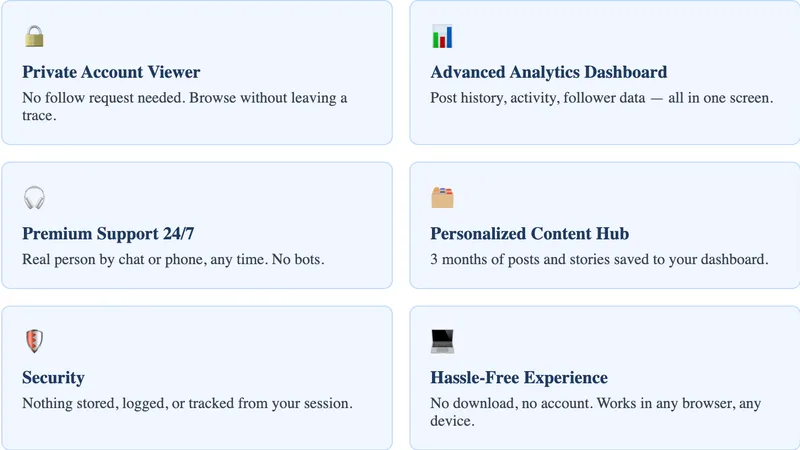
Private Account Viewer — No follow request, no footprint. Browse profiles completely undetected, with nothing added to their followers list.
Advanced Analytics Dashboard / Activity Tracker — Track how any account evolves over time. Post updates, activity patterns, and profile changes — all organised in one clear dashboard.
Hassle-Free Experience (no IG account, no install) — Nothing to download, nothing to sign up for. Open your browser, enter a username, and you’re ready to go — on any device.
Security (no personal data stored) — Everything you check stays completely yours. No logs, no stored data, no record of your activity kept anywhere.
Personalized Content Hub (3-month content storage) — Never lose content to expiry again. Posts and stories from the past 3 months are saved directly to your personal dashboard.
Premium Support (24/7 chat + phone) — Whether you need help at 2 AM or mid-afternoon, real support is available any time — by chat or phone.
Most tools stop at the basics, but this Instagram account activity tracker doesn’t. It goes further, giving you extra tools that turn a quick profile check into a much more detailed look at someone’s activity.
- The Downloader lets you save stories, posts, and videos directly to your device — so nothing disappears before you’ve had a chance to review it.
- The Tagged photo viewer surfaces every photo the account has been tagged in, revealing connections and context that the main profile grid never shows.
- The Comment viewer lets you read through every comment on any post.
- The Follower viewer gives you the complete followers and following lists at a glance.
- The Like viewer shows exactly who has engaged with their content.
Manual checking gives you fragments. You catch what you catch, miss what you miss, and have no record of either. If you need to know how to check someone’s activity on Instagram in any consistent way, that’s a real problem. These tools change that — everything in one place, nothing expiring before you’ve had a chance to look at it.
How to check Instagram activity:
- Open the website and search for the Instagram username you want to view.
- Choose the matching profile from the search results.
- Access your personal dashboard.
- Browse post history, story activity, and profile changes.
- Return any time to monitor new updates and track patterns over time.
What Can Accountviewer Track That Instagram Can’t?
Instagram’s native tools were built for sharing, not monitoring. Post notifications tell you when someone publishes something new. Profile visits leave no record. Stories disappear. None of it adds up to a coherent picture of how someone actually uses the app.
This Instagram tracker works differently. It retrieves profile activity without requiring an Instagram login, leaves no trace on the account being viewed, and organises everything into a single dashboard. Instead of catching individual moments, you’re looking at patterns — post history, story activity, and profile changes over time, going back up to three months. For anyone trying to figure out how to check someone’s Instagram activity beyond surface-level posts, that depth of history makes a real difference.
| Activity Type | Instagram (Native) | Accountviewer |
| Story views | Only visible if you watch in time | Organised insights, accessible any time |
| Post activity | New posts only, no history | Full timeline and post history |
| Profile visit detection | Not available | Pattern-based activity insights |
| Activity timeline | Not available | Available — up to 3 months |
| Historical data | Not available | Up to 3 months of stored content |
FAQ
Yes — but Instagram only surfaces limited public information like posts and comments. To check someone’s Instagram activity in any real depth, a dedicated Instagram activity tracker private account tool gives you significantly more visibility.
Yes. Instagram removed the “Following” activity tab in 2019, which had let users see what accounts someone recently liked or followed. It hasn’t been replaced with anything equivalent.
Instagram doesn’t show who visits a profile. If you watch someone’s story, however, your username appears in their viewer list. For users looking into how to check someone’s activity on Instagram, tools that require no login and make no direct contact with the account are the safest choice.
The most reliable option is a tracker built for Instagram accounts — one that pulls data without any Instagram login and leaves no trace. That’s exactly what a purpose-built Instagram activity tracker private account tool is designed to do, and it’s the most dependable way to check someone’s Instagram activity without drawing attention.
Conclusion
Instagram’s native tools weren’t built for monitoring. They show you fragments — a post here, a story there — with no way to view Instagram activity as a coherent pattern over time. If you’ve been wondering how to check someone’s Instagram activity, the native tools simply won’t get you there.
Accountviewer‘s Advanced Analytics Dashboard changes that. Post history, story activity, profile patterns, and three months of historical data — all in one place, all without an Instagram account, all without leaving a trace.